 Once the themes are installed, you can manage them on the phone using the Themes application on a Series 60 device or the Settings menu on a Series 40 device.
If your phone supports themes, it probably shipped with more than one theme preinstalled.
The theme management application allows you to see a list of installed themes, and then preview and activate them. You can also do some basic customization for any of the installed themes on the phone. For instance, you can change the wallpaper, ring tone, and color scheme.

The Series 40 and Series 60 themes are packaged in .nth and .sis files, respectively. You can either create your own theme packages using the tools described in this hack or purchase and download commercial theme packages from a web site. You can install the theme packages via the following means:
You can download and install the themes directly Over The Air (OTA) via the phone's Services browser. It is, however, necessary to set the correct MIME types on a download server: application/vnd.symbian.install for Series 60 theme *.sis files; and application/vnd.nok-s40theme for Series 40 theme *.nth files.
You can transfer the theme package files to the device via Bluetooth and IR. Once you open the message containing the file, the phone prompts you to install it.
You can transfer a theme package to a phone by sending it as an MMS message attachment to the phone. You will be prompted to install it when the message is opened. The only limitation that could apply is if there is a size restriction on the delivery mechanism, such as the 100KB limit often placed on MMS messages. In this case, you will need to consider the size limitation when you create the theme.
You can install multiple themes on a device and switch between them at any time.

The Nokia Series 40 Theme Studio is downloaded as a zip file that contains a single *.exe installation file. Installation is straightforward but does require a license key, which any registered member can obtain free of charge from Forum Nokia. You can request the key in advance or during the installation process.
When started, the Nokia Series 40 Theme Studio provides a simple interface for defining the components of a Series 40 theme: the color scheme, ring tone, wallpaper, and screensaver for UIs of 128 x 128 pixels and 128 x 160 pixels.
The tool supports the definition of wallpaper and screensavers using files in JPEG, GIF, PNG, BMP, or Wireless Bitmap (WBMP) image formats, and ring tones as AMR or MIDI format files. Once the theme's components have been defined, the Nokia Series 40 Theme Studio allows you to simulate all of the device's main screens and screen types, such as the main and idle screens or lists, notes, and find screen types.
Once you've created a theme, the tool saves the content as a Series 40 Theme package file (*.nth) ready for delivery to the phone.
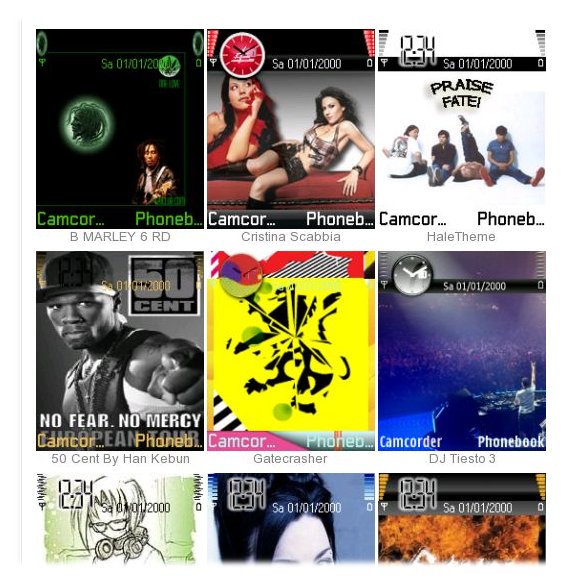
The Series 60 Theme Studio (for Symbian OS) creates themes for Series 60 devices. The Series 60 Theme Studio is downloaded as a zip file containing an installation *.exe file, a release notes text file, and the Series 60 Theme Studio Artist's Guide in PDF format, which provides a comprehensive guide to using the tool. You have to register for a free user account with Forum Nokia first and log into the web site before you can download the zip file. During installation, which is straightforward, you can specify an external image and sound editor for editing theme elements, although these can also be defined after the tool is installed.
When you launch it, the Series 60 Theme Studio (for Symbian OS) provides a menu-like interface for defining the various visual and audio components of a Series 60 theme. You can build a Series 60 theme to provide custom images for almost every component of the Series 60 UI, even to the extent of defining custom icons for third-party applications. It is not necessary for every theme to contain all the customizable elements, and when a new theme is created, the tool provides options to define which elements will be customized. These customized elements can also be based on the contents of an existing theme.
The tool supports the definition of all theme components using BMP image files, except for screensavers (which are created as a Symbian OS DLL and are included in the theme package) and the ring tone and message alert (which can be defined as WAV, MP3, or device-specific-supported ring tone formats). Once the theme's components have been defined, the Series 60 Theme Studio (for Symbian OS) allows you to simulate all of the device's main screens, screen types, and certain applications, such as the Calendar and Contacts.
Once you've created a theme, the tool lets you save it as a Symbian installation file (.sis file), with options for digital signing and Digital Rights Management (DRM). Once these steps have been completed, the theme is ready for delivery to your phone, friends, or customers.
 Using themes, you can simultaneously change many elements of the phone UI, especially on Series 60 phones.
Themes allow you to fully customize many visual and audio elements on your phone UI beyond the wallpaper and the ring tone. Themes are supported only on relatively new Nokia phone models:
For Nokia Series 60 phones, only the ones that were released at the same time as or after the Nokia 6600 support themes. Examples are the Nokia 6600, 6620, 7610, and 6630 devices.
For Nokia Series 40 phones, only the ones that were released at the same time as or after the Nokia 3220 support themes. Examples are the Nokia 3220, 6020, 6170, 7260, 7270, and 7280 devices.
On a Series 60 device, you can customize all UI elements in the following list via themes:
Elements of the idle screen, including the wallpaper
Menu background
UI areas, including status, list, and column areas
Icons, including application, list, and note icons
Highlights on list, grid, and input areas
Pop-up windows
System indicators, including volume, tab, signal strength, battery charge, navigation, and wait/progress bar indicators
Color scheme
Sounds, including ring tone and message alert
Screensavers
On a Series 40 device, however, your customization choices are much more limited. You can change only the ring tone, wallpaper, operator logo, screensaver, and color theme. Nokia is actively working on expanding theme support for future Series 40 devices.
On a Nokia Series 60 smartphone, you can associate a theme with any screensaver installed on the device. Mirkocrocop posted a tutorial on NokiaFree forums on how to quickly make your own screensavers from a series of images. It is verified to work on Nokia 6630 smartphones. Visit http://nokiafree.org/forums/showthread.php?p=364259 to read the tutorial. Darla Mack expanded the method and discussed how to copy screensavers from one device to another on her blog: http://darlamack.blogs.com/darlamack/2005/05/new_way_to_ make.html. Check them out!





